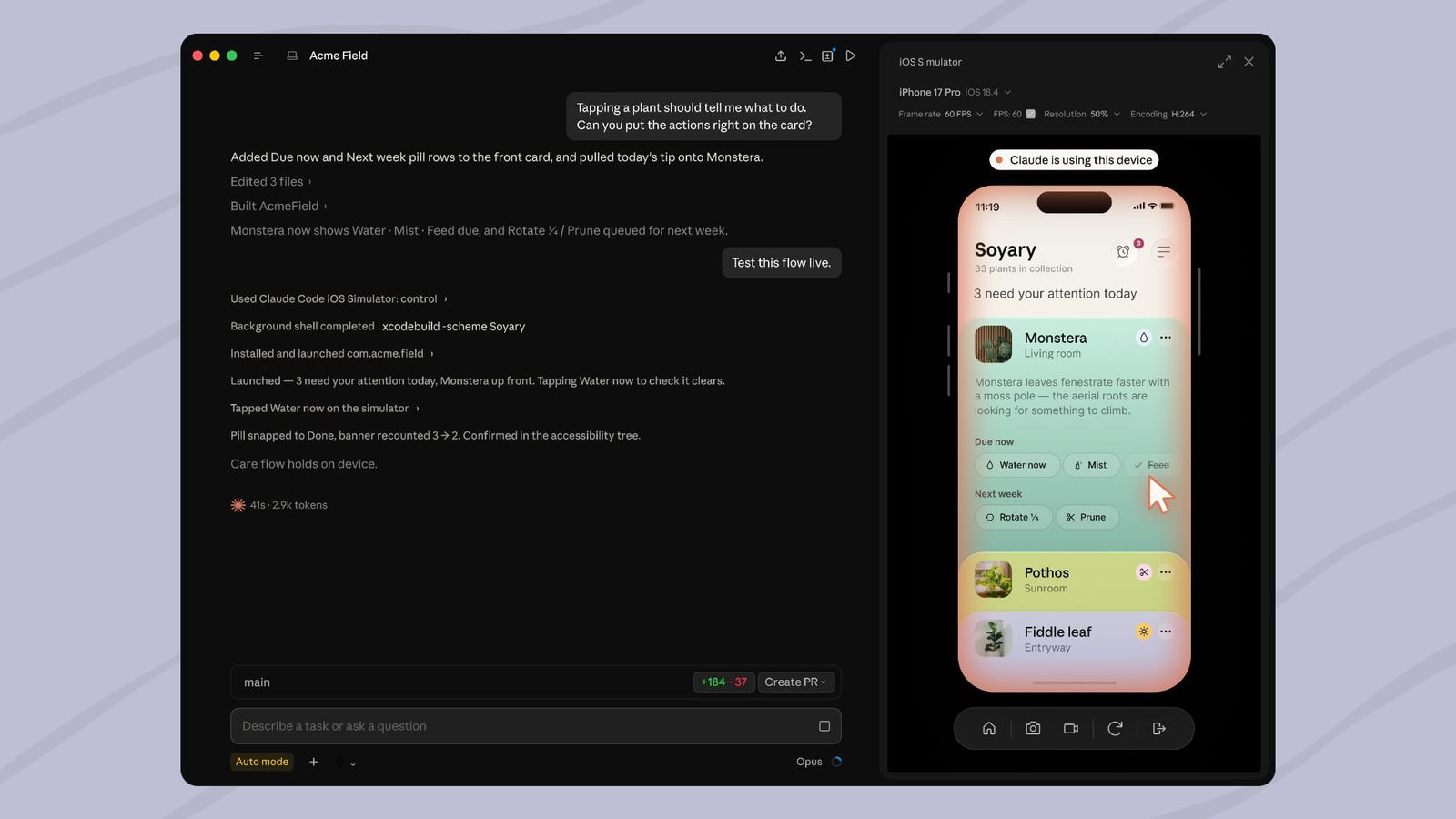
Anthropic has updated the desktop version of Claude Code: the AI can now independently open iOS Simulator, launch an app, click buttons, catch errors, and immediately fix the code — in a loop, without developer involvement. The public beta became available on July 21, 2025.
How it works technically
The key difference from previous "computer use" tools is in how the screen is accessed. The simulator panel communicates directly with Apple Simulator tooling, bypassing macOS Accessibility and Screen Recording. This means: the AI doesn't "capture" your desktop, doesn't hide windows, and doesn't interfere with parallel work.
As noted in Anthropic's official documentation, when Claude builds, installs, or tests an app, the panel opens automatically and streams the device screen in real time. The developer can simultaneously tap on the simulator — Claude continues working nearby.
"The simulator panel controls the simulator directly, so it doesn't require computer use and never captures your screen"
Claude Code Documentation
Each session gets a separate simulator. You can keep up to four panels open simultaneously. The first launch — a one-time permission for device control and screenshots; after that, Claude acts independently.
Limitations they don't mention in headlines
- Mac + Xcode only. You need macOS with iOS platform installed in Xcode — no Linux, no Windows.
- Local sessions only. Cloud and SSH sessions don't have access to the simulator on the local machine.
- Not available for Enterprise. The feature is available on Pro, Max, and Team plans — the enterprise plan is excluded.
- Screenshots go to Anthropic. This is the most sensitive point.
The question lawyers will ask first
Anthropic explicitly states: screenshots of the simulated device are sent to the company and stored according to standard conversation retention settings. The official recommendation is not to log into real accounts on a device controlled by Claude.
For an indie developer building a calculator, this is a minor detail. For a team testing a fintech app with test tokens or a prototype with real API keys in the config — the condition is fundamental. This is precisely why the absence of the feature in the Enterprise plan looks not like an oversight, but as a deliberate decision: corporate clients with strict NDAs and data requirements will get separate terms or won't get it at all.
The behavior differs from the CLI version: there Claude accesses the simulator through computer use — that is, it controls the screen with the mouse, like a human, with all corresponding permissions.
What changes for the market
Until now, "AI coding" in mobile development stopped where the emulator began: AI could write code, but couldn't see the result. This integration closes the feedback loop — Claude now goes through the same "run → see → fix" cycle that previously required a person at the keyboard.
The practical consequence: an iOS app prototype from idea to working build becomes a task for a single developer without a QA team — or even without a developer experienced in Swift, if Claude can handle Xcode configuration.
If Anthropic adds Android Emulator support and removes restrictions for Enterprise, the question is no longer about convenience — but whether companies are ready to hand over screenshots of working prototypes to a third party as a condition of using the tool.